
On this page
- The 8 PM problem
- What "WhatsApp ERP" actually means
- A worked example: ORD-001 stitching 200
- What can be captured this way
- How WhatsApp Business API approval works
- Privacy: what stays private, what's recorded
- Where the WhatsApp ERP model doesn't work well
- How adoption actually unfolds
- Further reading
- A note on UdyogFlow
- Sources
WhatsApp ERP means production data captured from supervisor messages — a supervisor sends "ORD-001 stitching 200" to the factory's WhatsApp Business number, an AI parser converts it into a structured production update, and the order's status updates instantly. No Excel, no logins, no new app. For Indian factories where WhatsApp is already the universal floor channel, this is the most adopted form of ERP data entry.
The single most common production-tracking setup in Indian MSME factories is not an ERP. It's a WhatsApp group called "Production Updates" with 25 members, scrolled by the merchandiser every morning, with numbers copied to an Excel sheet for the owner's evening review. By Friday the Excel is wrong in three places, two cutting orders are running late, and nobody knows it.
WhatsApp ERP — production data captured directly from supervisor WhatsApp messages — has become a credible alternative for factories that have outgrown the spreadsheet phase but can't justify a six-month ERP rollout. This post walks through how it actually works, with a worked example, the WhatsApp Business API approval process you need to set up, and an honest look at where the model works and where it doesn't.
The 8 PM problem
Walk into a small Indian garment factory at 8 PM. The cutting room is winding down, stitching is on the last hour of its shift, finishing has two cartons ready for packing. The owner is at his desk on the second floor, scrolling six WhatsApp groups:
- Production-floor-1: "Today stitching 180 ORD-014, 220 ORD-015"
- Cutting-team: "Cutting done ORD-018 today 540 pieces"
- Packing: "Packed 320 of ORD-008, balance tomorrow"
- Suppliers: "Buttons ORD-014 dispatch tomorrow morning sir"
- QC-final: "ORD-015 final audit pass 220"
- Owners-group: (his own private WhatsApp group with two trusted supervisors who report directly to him)
He copies the numbers to Excel. The merchandiser sitting next to him is doing the same exercise from her phone. By 9 PM the production update is "in the system" — meaning in two separate Excels that disagree on three numbers.
Tomorrow morning the buyer asks for an update on ORD-014. The merchandiser opens her Excel and gives a number. The buyer asks for fabric received status. The merchandiser opens a WhatsApp PDF from the vendor (sent three days ago, scrolled past on Saturday). The buyer asks about defect rate. The merchandiser apologises and promises an update by evening — that data only exists in a supervisor's notebook.
This is the 8 PM problem. The data exists. It's just trapped in WhatsApp and Excel, scattered across people who don't talk to each other in real time. Solving it with a traditional ERP means asking supervisors to learn an app, getting them to log in, getting them to enter data correctly — and most factory owners who've tried that have failed at step one.
What "WhatsApp ERP" actually means
WhatsApp ERP is a deliberately specific term. It doesn't mean "an ERP that sends WhatsApp notifications". Marg, BUSY, Tally and Zoho all send WhatsApp notifications — invoices, reminders, alerts. That's outbound messaging.
WhatsApp ERP means the inbound path: production data captured from supervisor messages, parsed into structured updates, written to the ERP database in real time. The supervisor never opens an ERP app. They send a message the way they already send 200 messages a day, and the ERP updates itself.
Three things have to be true for this to actually work:
- A dedicated WhatsApp Business number. This is a separate business identity, not the owner's personal number. Supervisors message this number from their personal phones the way they'd message a buyer or vendor.
- An AI parser that understands factory-floor language. Supervisor messages aren't structured. "ORD-001 stitching 200" works; so does "200 stitching ORD-001 today"; so does "ORD-001 mein 200 stitch ho gaya". The parser has to handle Hindi, Hinglish, regional languages and voice messages.
- A validation step against live data. A message claiming "ORD-001 stitching 500" when ORD-001 only has 400 pieces in cutting should trigger a flag, not silently record an invalid number. The parser needs to know the live order state.
When all three are in place, supervisors record production by doing what they were doing anyway — sending a WhatsApp message. The ERP becomes the structured view of the same data, available to the owner, merchandiser and accounts in real time.
A worked example: ORD-001 stitching 200
A small worked example from a knit garment factory making polos. The factory has one open order — ORD-2026-001, 4,200 pieces, 60 days from PI confirmation, currently in week three of an eight-week T&A.
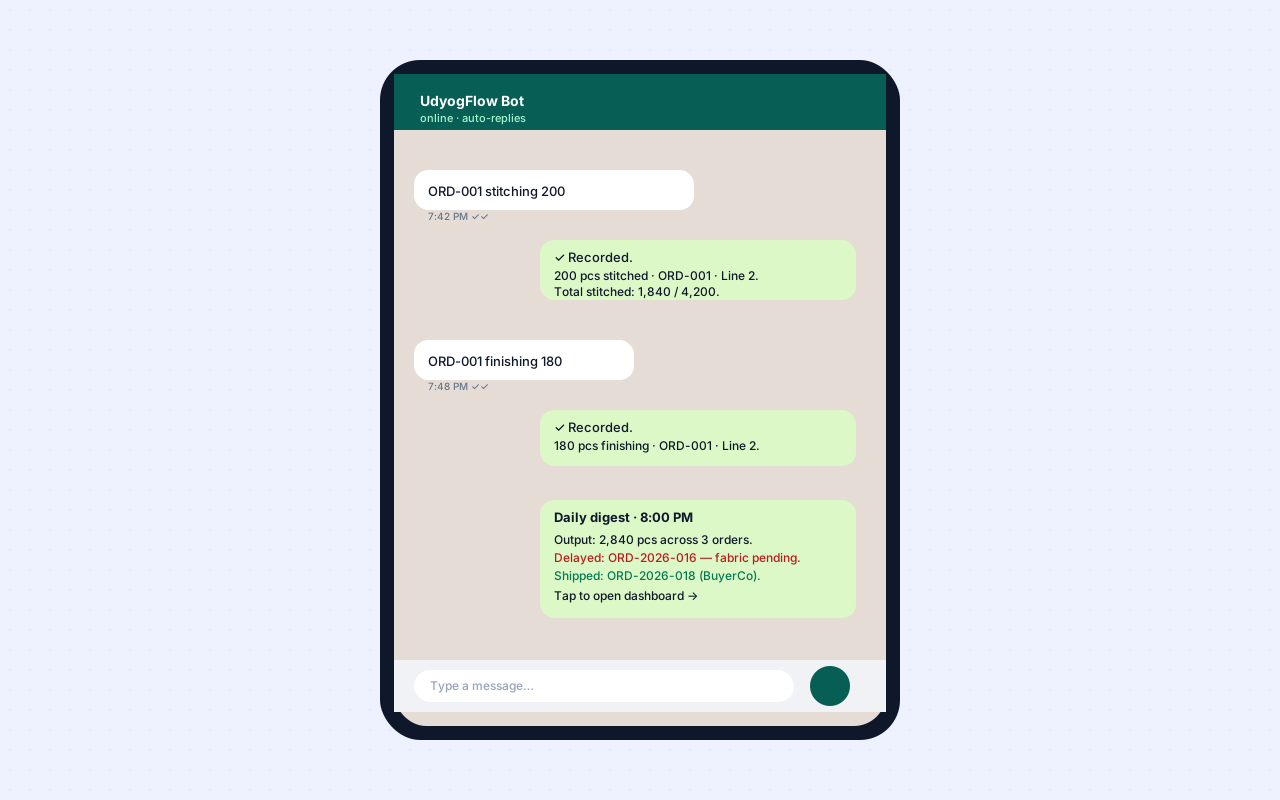
Tuesday 7:42 PM. The stitching line in-charge (Suresh) finishes his shift and pulls out his phone. He types into the factory's WhatsApp Business number (the one mapped to UdyogFlow):
ORD-001 stitching 200
He hits send.
Inside two seconds:
- The message lands at the WhatsApp Business API endpoint.
- The parser identifies three entities: order (ORD-001 — matched to ORD-2026-001 because there's only one active ORD-001 in the system), operation (stitching), quantity (200).
- The parser validates: ORD-2026-001 has 1,640 pieces stitched as of last entry. Adding 200 brings stitched count to 1,840, which is within the ordered 4,200. Valid.
- The production board updates: stitched count = 1,840 / 4,200, last update timestamp = Tuesday 7:42 PM, operator = Suresh.
- The bot replies on WhatsApp:
✓ Recorded. 200 pcs stitched on ORD-001 by Suresh. Stitched total: 1,840 / 4,200.
Suresh sees the confirmation, pockets his phone, locks the cutting room and goes home. The whole interaction takes him eight seconds.
Same Tuesday 8:00 PM. The factory owner is at home. He gets a WhatsApp message from the same bot — the daily digest:
Daily digest · Tuesday
Output today: 2,840 pcs across 3 orders. Delayed: ORD-2026-004 — fabric pending from MRF supplier. Shipped: ORD-2026-003 — 1,200 pcs to BuyerCo, BL attached.
Tap to open dashboard →
The owner doesn't open the dashboard. He's seen what he needs to see in three lines. He sleeps well.
Wednesday 9:00 AM. The merchandiser opens her laptop. She doesn't ask anyone for production numbers — they're already on the order screen. She spends her morning chasing buttons from the vendor for ORD-2026-001, not chasing supervisors for last night's stitching count.
This is the loop, repeated daily, for every order in the factory.
What can be captured this way
Production stages where WhatsApp entry works well:
- Cutting completion — "ORD-001 cutting 1200" or "cut 1200 of ORD-001"
- Stitching daily output — "ORD-001 stitching 200"
- Finishing daily output — "ORD-001 finishing 180"
- Bundle completion — "ORD-001 bundle B-045 done"
- Material issue acknowledgment — "received fabric ORD-001 200 m"
- Sub-contractor send/receive — "sent to plating job-014 100 pcs" or "received from MRF 200 m"
- QC inline notes — "ORD-001 5 defects open seam, sent to rework"
- Dispatch confirmation — "ORD-001 dispatched 1200 pcs"
Stages where WhatsApp entry is less effective and we recommend the web app:
- BOM editing — multi-field structured data that doesn't fit a message
- Costing calculations — needs visual feedback
- AQL final audit reports — needs photo attachments, defect categorisation
- Invoice generation — needs preview, edit, send workflow
- Buyer master setup — onboarding-style structured input
Roughly 80% of daily production data capture works well over WhatsApp; 20% needs the web app. That ratio means supervisors live almost entirely in WhatsApp, while owners, merchandisers and accounts split between WhatsApp (for ambient updates and quick queries) and the web app (for analysis, configuration and document generation).
How WhatsApp Business API approval works
To set up a WhatsApp ERP integration, you need a dedicated WhatsApp Business API number. This is different from WhatsApp Business (the free mobile app) — the API is for business automation, sends structured messages programmatically, and requires Meta's approval.
The approval process in 2026:
- Choose a Business Solution Provider (BSP). Meta works with approved partners — Twilio, 360dialog, Karix, Gupshup, MessageBird and many others. Most factory WhatsApp ERP setups go through a BSP rather than connecting to Meta directly.
- Verify your business with Meta. This requires a Facebook Business Manager account with verified business details: GST number, business name, registered address, phone number. Meta-verified businesses get higher daily-message limits and faster approvals.
- Choose and verify a phone number. This is the number supervisors will message. It can be a new number or an existing one (not currently used in WhatsApp). Once registered to the API, it cannot also be used on the WhatsApp mobile app — it's an exclusive registration.
- Submit message templates for approval. Outbound messages (digests, alerts, document sends) use pre-approved templates. Inbound messages (supervisor production updates) don't require template approval since they're user-initiated.
- Approval timeline. Business verification: 2–5 days. Phone number registration: same day. Template approval: 1–2 days per template, with revisions handled inline.
For a typical Indian factory setting up WhatsApp ERP through UdyogFlow, the timeline from "decide to do this" to "first supervisor message recorded" is one day to one week, depending on whether your Facebook Business Manager is already verified and how quickly your team can supply the business details.
The recurring cost is modest. Meta charges per business-initiated message (digests, alerts, document sends) based on conversation type (utility, marketing, authentication, service). User-initiated conversations (a supervisor sending you a message) cost less. Total monthly WhatsApp API cost for a 100-person factory is typically ₹1,500–4,000.
Privacy: what stays private, what's recorded
A reasonable concern for factory owners: if my factory runs on WhatsApp, who can see what?
The cleanest model:
- The WhatsApp Business API number is dedicated to your factory's UdyogFlow tenant. It listens only to messages sent to that number — never personal chats, never group archives from your supervisor's other groups, never your own personal WhatsApp.
- Every parsed message is logged on the order timeline with the original text, the parsed interpretation, the timestamp and the sender. The chat is the audit trail. If a parse looks wrong, your merchandiser can see the original text and correct it.
- Supervisors send from their personal phone to the factory business number, the same way they'd send to a buyer or vendor's business number. Their personal chats remain on their phone, untouched.
- Data residency: the WhatsApp message stream is processed in India (Mumbai region) by UdyogFlow's parsing service. The original WhatsApp infrastructure is operated by Meta and follows their data-handling policies.
Most factory owners who've worried about WhatsApp privacy upfront have found, after the first month, that the audit-logging is actually a feature: the timestamped record of who said what when is more reliable than the verbal "I told you yesterday" exchanges that used to drive disputes.
Where the WhatsApp ERP model doesn't work well
We've found three cases where the WhatsApp ERP model genuinely isn't a fit.
- Factories with very high supervisor turnover. If you replace floor supervisors every two months, the trust and habit-building that makes WhatsApp ERP work doesn't establish. Use the web app or a touch-screen kiosk on the floor instead.
- Factories that need detailed real-time photo evidence for every operation. WhatsApp can attach photos, but for sectors where every step needs photo documentation (defect inspection in detail, sub-contractor finished-goods inspection, lab sample checks), the web app's structured photo upload + categorisation is faster than 50 WhatsApp messages per day.
- Factories with no smartphone access on the floor. Some older factories with feature phones or no phones at all for floor staff need a different setup — typically a touch-screen kiosk in the cutting room or a tablet-based daily entry. WhatsApp ERP needs a WhatsApp-capable phone in the supervisor's hand.
For everyone else — which is the majority of Indian MSME garment, leather, footwear, metalwork and packaging factories — WhatsApp ERP is the production-data capture model that actually gets adopted, because it's the channel that's already adopted.
How adoption actually unfolds
In pilot factories we've tracked from kickoff to month three:
- Week 1 — Setup. WhatsApp Business API connected, dedicated number live, three supervisors mapped to operators in UdyogFlow.
- Week 2 — Pilot. Three supervisors send daily entries; the merchandiser sanity-checks every entry. Parser accuracy lands at around 92% on day one and climbs to 96% by day five as the parser learns the factory's specific abbreviations and operator names.
- Week 3 — Expansion. Remaining supervisors mapped. Six to ten people now sending daily updates. Adoption rate (% of expected daily updates actually sent via WhatsApp) hits 80%.
- Week 4 onwards — Stable use. Adoption above 90%. Owners stop checking six WhatsApp groups for production updates; they check the digest at 8 PM and open the dashboard if anything's flagged.
- Month 2. The factory starts using WhatsApp for vendor PO sends, buyer dispatch confirmation, owner-to-merchandiser ambient communication. Volume of automated WhatsApp messages doubles.
- Month 3. AI Assistant queries (voice + text) come online for owners — "show me orders shipping in 7 days that don't have fabric in house yet". The factory has fundamentally changed how it captures and accesses operational data.
This is what successful WhatsApp ERP adoption looks like. It's not a flag-day cutover; it's a one-month build-up.
Further reading
If WhatsApp ERP is the operational layer, the rest of the picture is:
- Best ERP for MSME Manufacturers in India (2026) — how WhatsApp-native ERPs compare to Tally, Zoho Books, BUSY, ERPNext, Odoo and SAP Business One.
- AQL 2.5 Explained for Garment Exporters — the QC layer that pairs with floor data capture.
- Industry workflows — sector-specific floor patterns for garments, leather, footwear, metalwork and packaging.
- How UdyogFlow compares to other ERPs — head-to-head with eight common alternatives.
A note on UdyogFlow
UdyogFlow is built around WhatsApp-native production entry as a first-class concept, not an afterthought. The AI parser supports Hindi, Hinglish, Tamil, Punjabi and Gujarati for common factory-floor phrases. Voice messages get transcribed before parsing. Every parsed message is logged for audit. Setup is one day, founder-led. See how WhatsApp integration works in detail or explore the full feature set.
Sources
- WhatsApp Business Platform documentation, Meta — overview of WhatsApp Business API, including conversation types, message templates, pricing tiers and Business Solution Provider partner list. Available at developers.facebook.com/docs/whatsapp.
- Meta Business Manager verification process and Trust Center — the canonical reference for business verification, phone number registration and template approval. Available at business.facebook.com.
- WhatsApp Business Solution Provider (BSP) Partner Directory — the list of approved partners (Twilio, 360dialog, Karix, Gupshup, MessageBird and others) maintained by Meta.
- WhatsApp Business Conversation Pricing — Meta's published rate card for outbound business-initiated conversations across conversation types (utility, marketing, authentication, service). Updated periodically; current rates available at the Meta Business Platform pricing page.
- Confederation of Indian Industry (CII), MSME Manufacturing Pulse 2024–25 — survey data on production data capture practices among Indian MSME manufacturers.
- Apparel Export Promotion Council (AEPC) — industry papers on factory floor operations digitisation among Indian garment exporters.
- UdyogFlow product positioning, integration setup workflow and parsing accuracy metrics reflect the UdyogFlow team's pilot deployments as of mid-2026.
Filed under
- WhatsApp ERP India
- production tracking
- factory
- MSME
- manufacturing
- supervisors